
Stock Reports provide different reports for reviewing stock quantities, movements, values, prices, ageing and other product information.
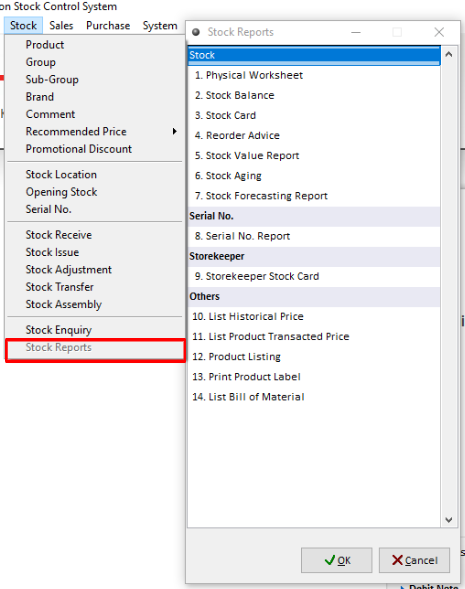
Physical Worksheet
Navigate: Stock > Stock Reports > Physical Worksheet
This report lists all product records in system quantity. It will be taken to the warehouse and checked on the product's actual physical quantity to make an adjustment when necessary.
Stock Balance
Navigate: Stock > Stock Report > Stock Balance
This report shows the product’s quantity brought forward, stock movement and the balance quantity on hard.
Stock Card
Navigate: Stock > Stock Report > Stock Card
This report lists all product actual transactions in summary (movement of quantity), total balance and product’s unit price
Reorder Advice
Navigate: Stock > Stock Report > Reorder Advice
This report lists all products actual quantities as compared to the minimum level and the required quantity to be reordered.
Stock Value
Navigate: Stock > Stock Report > Stock Value
This report lists product status (quantity movement) and value.
Stock Aging
Navigate: Stock > Stock Report > Stock Aging
This report lists products aging status (movement) in quantity for monthly and yearly.
Stock Forecasting
Navigate: Stock > Stock Reports > Stock Forecasting
This report shows the forecast of products on hand.
List Historical Price
Navigate: Stock > Stock Reports > List Historical Price
This is for listing historical prices to trace back that previous item bills (in greater details) that were already issued by the company.
List Product Transacted Price
Navigate: Stock > Stock Reports > List Product Transacted Price
This report shows a list of bills with the transacted price of an product sold to customer or bought from supplier
Product Listing
Navigate: Stock > Stock Reports > Product Listing
This is for printing a list of items with detailed information.
Print Product Label
Navigate: Stock > Stock Reports > Print Product Label
This is for printing product’s barcodes.